 That Vibe Coder
Last week I built a system that updates my newsletter analytics in Notion by itself. I do not open the spreadsheet, I do not type anything in, and the numbers are just sitting there the next morning. This is what the new Notion Developer Platform makes possible, and here is exactly how it works.
The Developer Platform
Notion quietly dropped their Developer Platform, and it turns Notion from a place you fill in by hand into a place that fills itself in. Syncing Claude up to Notion was already cool. These new syncs go several steps further.
- Workers - Notion runs little programs in the background on its own machines, so there is nothing for you to host.
- Database sync - any app that holds your data can feed a Notion database automatically, no more copy and pasting.
- Two-way webhooks - other apps can poke Notion and tell it to do things, not just the other way around.
The simple version: Notion syncs all your data on their own servers with no manual triggers needed.
What I Built
My newsletter lives in a tool called Beehiiv. Every time I send one out it racks up numbers, and I used to check all of them by hand. Now those numbers walk themselves into Notion.
- Recipients - how many people the issue actually landed with.
- Open rate - how many of them opened it up.
- Clicks - how many tapped through to something.
- Ad payout - what the sponsor slot earned that send.
A little Notion Worker grabs all of it and drops it straight into a database for me every day at 5:30am. The best part is it is a one time setup. From here on out, my newsletter stats populate inside Notion on their own.
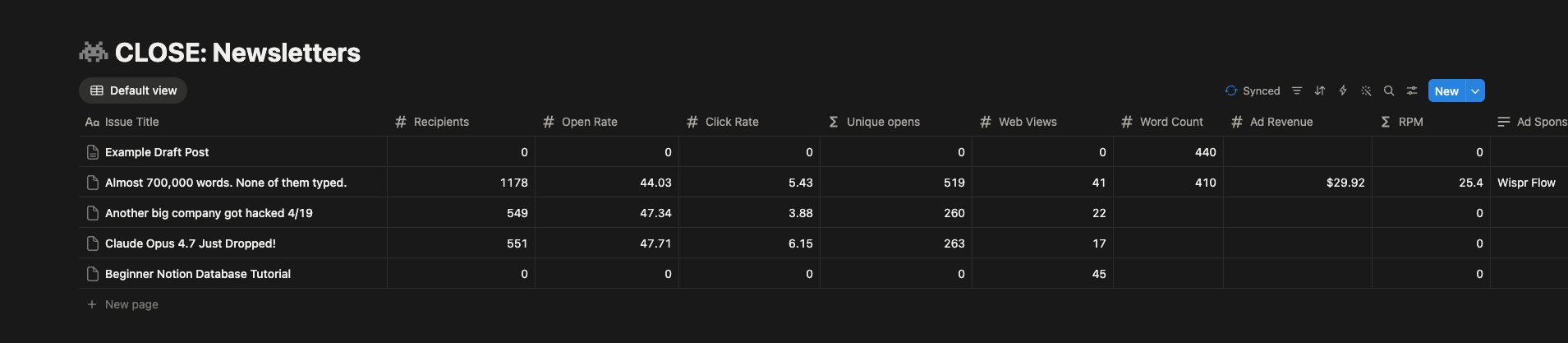
This is not about making fancy dashboards. It is about building structured systems that fit inside of your Notion.
The Bigger Picture
One spot in Notion can hold everything your team needs to see. Think about how much of your business is scattered across logins right now. Your payments live in one tool, your email is in another, your numbers are in a third, and every one of them needs a password.
You do not actually want everyone holding the keys to all of that. Your assistant does not need your Stripe login just to tell you who paid this week. This is where the syncs get good.
| Daily reality | Before | After |
|---|---|---|
| Where the data lives | Scattered across logins | One spot in Notion |
| Who gets access | Everyone holds every key | Right people see what they need |
| Setup | Manual, every time | Once, then it flows |
Set it up once and your whole team works from the same place instead of chasing logins.
The Real Work
It is free to play with right now, which is the best reason to jump in. This is new and in beta, and the paid pricing kicks in August 11. So you have a little time to mess around care free.
- Play now - figure out what is worth keeping before the meter starts.
- No rush to ship - you will not have this running by Friday, and that is fine.
- The real work - the tech showing up is the easy part. Knowing what to build and how it fits your business is the hard part.
Who Actually Wins
The people who win here are the small handful who sit down and figure out their first system while it is still early.
- A few people - build one small thing now and keep that edge for months.
- Most people - glance at it, decide it is too complicated, and move on.
- The opportunity - that gap between the two groups is wide open today.
Picture the Monday morning where the manual work is already done. That is the thing we are walking toward, and it is a lot easier to get there with people building the same stuff right next to you.
Build It Early
That early edge is the whole reason The Vibe Stack exists. It is my free community where we are figuring this out together, while it still gives you an advantage instead of being the thing everyone already knows.
- Build together - we work out these systems side by side, not alone.
- Stay early - get your first auto-updating system running while it is still free to play with.
Come build it with us over at The Vibe Stack.