 That Vibe Coder
Anthropic just dropped Claude Opus 4.7. If you use Claude for coding, research, or building anything serious, this one actually matters. It is better at coding and terminal work, it sees images at 3x higher resolution, and it thinks harder by default. The catch is that it burns through more tokens to do all of that. Here is what changed and exactly what to do about it.
Start Here
Claude is an AI assistant made by Anthropic. Opus is their most powerful model, and Opus 4.7 is the newest version. If you already live in Claude every day, skip ahead.
Two names get mixed up a lot, so here is the quick map:
- Claude - made by Anthropic, the model we are talking about today
- ChatGPT - made by OpenAI, the main competitor
- Opus - the top tier of the Claude family, built for hard work
What Changed
These improvements are easy to feel. Opus 4.7 is not a full generational leap. It is a polished mid step between 4.6 and whatever Anthropic ships next, but the gains where it counts are big.
Here is the benchmark breakdown, accurate as of April 2026:
| Benchmark | Opus 4.6 | Opus 4.7 |
|---|---|---|
| Coding (SWE-bench Pro) | 53% | 64% |
| Document reasoning | 57% | 80% |
| Visual reasoning | 69% | 82% |
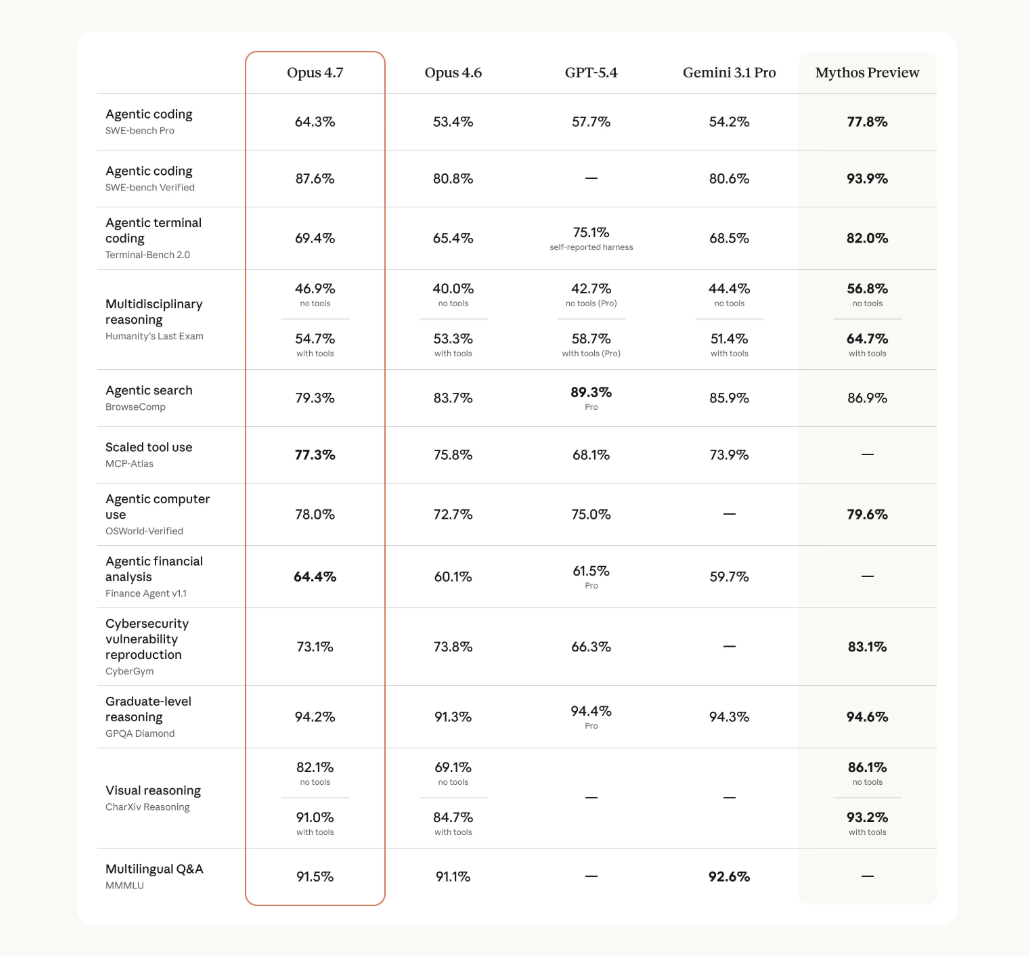
The document and vision jumps are the ones you will actually notice. Three new tools landed in Claude Code too: an extra high effort level that sits between high and max, a dedicated code review command, and an extended auto mode that is a safer way to work than skipping permissions.
What It Unlocks
For day-to-day work, the upgrade pays off most when you point Claude at messy inputs and long tasks. The model holds its place better and reads small details it used to fumble.
- PDFs and reports - far more reliable pulls from long documents
- Dashboards and screenshots - 3x resolution means it reads tiny text cleanly now
- Coding projects - fewer loops and cleaner first-pass execution
- Long agent tasks - better at tracking what it is doing across many steps
- Research - sharper judgment calls and synthesis of messy info
If you mostly chat with Claude to brainstorm or write, this will feel small. If you build with Claude Code or run agents, it is significant.
The Token Warning
More power comes with a cost here. Opus 4.7 uses more tokens than 4.6, and two changes under the hood are why.
- New tokenizer - input tokens run 1x to 1.35x higher than 4.6 for the same content
- Higher default effort - Claude Code moved from medium to extra high, so it thinks harder on every response
If you were already bumping into usage limits on 4.6, you will hit them faster on 4.7. You can fix it in one command. Run /effort high or /effort medium and move on. Medium is fine for most work. Save extra high and max for the genuinely hard problems.
Your First Moves
The smart move is a light touch. Ripping up your whole setup over a point release is the fastest way to lose a day, so test before you commit.
- Let it update - allow Claude Code to update itself when it prompts you
- Watch usage - keep an eye on your token burn the first few days
- Clear context often - reset when your context hits 25 to 40% full
- Test one task - try 4.7 on a single live job before you move everything
The models keep getting better. The people who win are not the ones chasing every update.
Keep It Organized
An upgrade like this is a good reminder to keep your workflow organized. When your prompts, skills, and projects live in one place, switching models is painless and you waste zero time hunting for the setup that worked.
I built a free Claude Dashboard template that keeps your whole setup in one place:
- Prompts - the ones you reach for again and again
- Skills - your custom commands and workflows
- Projects - everything you are actively building
Grab it, plug your setup in, and let the next model drop be a non-event.