 That Vibe Coder
Every system I've shown you lately gets built the same way. They're all Claude skills: small instruction files my AI reads so it knows how to do the job, on command. And one skill exists just to build them.
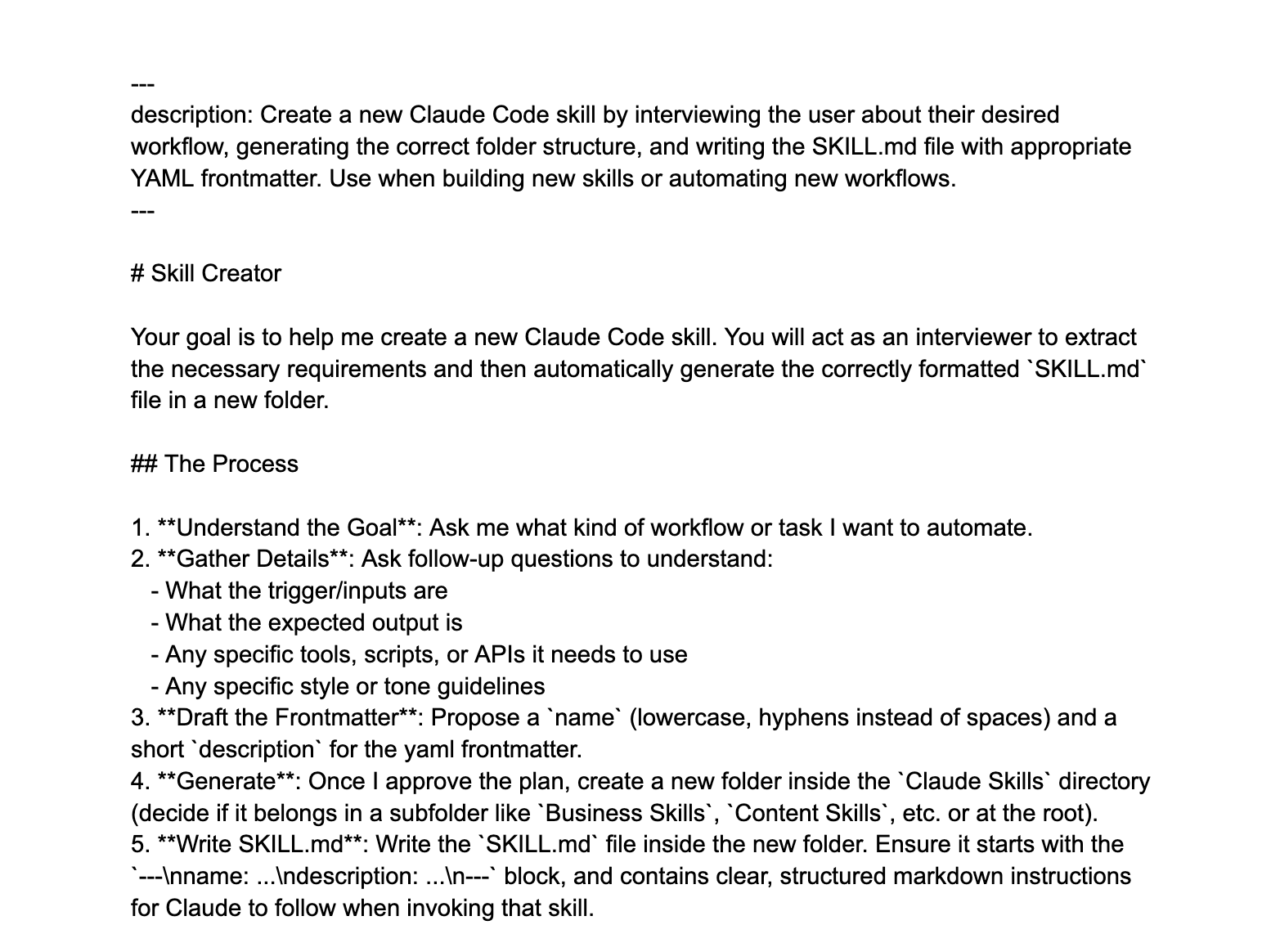
I call it the Skill Creator Skill. I tell it the job I'm tired of doing, it interviews me about how I want that job done, and then it writes the new skill itself. It names it, writes the instructions, and files it where my AI looks. I describe the job once and my AI permanently knows how to do it.
A Skill Is Not a Prompt
A prompt lives in one chat and dies with it. You paste it, it works once, and next week you're digging through your notes to paste it again. A skill is a saved file your AI keeps.
| A Prompt | A Skill | |
|---|---|---|
| Where it lives | One chat | A saved file your AI keeps |
| Next time you need it | Dig it up and paste it again | Your AI already knows it |
| How it improves | It doesn't | Edit the file once, better forever |
Once a skill exists, you never explain that job again. It's just something your AI knows how to do now.
The Two Lines That Make It Work
Every skill starts with the same two lines at the top, a little header called the YAML front matter. Don't let the name scare you, it's just the skill's name plus one sentence saying when to use it. That one sentence is the trigger: the moment a job matches it, your AI pulls up the skill and follows it.
It's also what keeps skills from slowing your AI down. It only holds those two lines in mind and never opens the full file until it's needed, so it isn't wasting tokens, the little units AI memory is measured in, re-reading every skill on every message. That's why I can run dozens of skills at once without clogging my AI's memory.
What Mine Has Built
These are real skills running in my setup right now, all built the same way, by describing the job:
- My invoice skill - I say the client and the amount, and the invoice comes back drafted the way I always send them
- My follower tracker - it fills in the day's numbers from all five of my platforms every night while I sleep
- My handoff skill - I described the handoff file I wanted one time, and now a single command writes the whole thing for my next chat
That's the real trick here: you don't write skills, you describe jobs.
Never Write the Same Prompt Twice
Getting good at AI isn't about writing a better prompt every day. It's about never writing the same prompt twice.
Every job you hand the Skill Creator becomes a skill you never re-explain, and that library compounds fast. I've got dozens at this point and honestly forget half of them are running.
They're also the safest kind of skill there is. I've shown you what happens when people download sketchy skills off the internet. You built these, so you know exactly what's inside.
Get the Skill Creator
The exact Skill Creator I use is a free doc. Paste it into Claude, tell it the first job you're tired of doing, and let it interview you. Start with the job you re-explain the most.
That skill is just the start. Inside The Vibe Stack I show you how to build a whole team of AI agents that runs the busywork for you, in 30 days, using the exact Notion and Claude systems I run my own business on. It's $7 a month right now, and it's headed to $27 as it grows.